Best CRM for Commercial Real Estate Brokers
How to choose CRM software built for commercial real estate's messy deal flow.

The best CRM for a commercial real estate broker is the one built around how CRE deals actually move: long prospecting cycles, property matching, multi-party closings with lenders and attorneys and landlords all pulling in different directions at once. A tool loaded with features but built on the wrong architecture will have you fighting your own software instead of closing deals. This piece walks through why that mismatch happens and how to figure out which platform actually fits your deal flow.
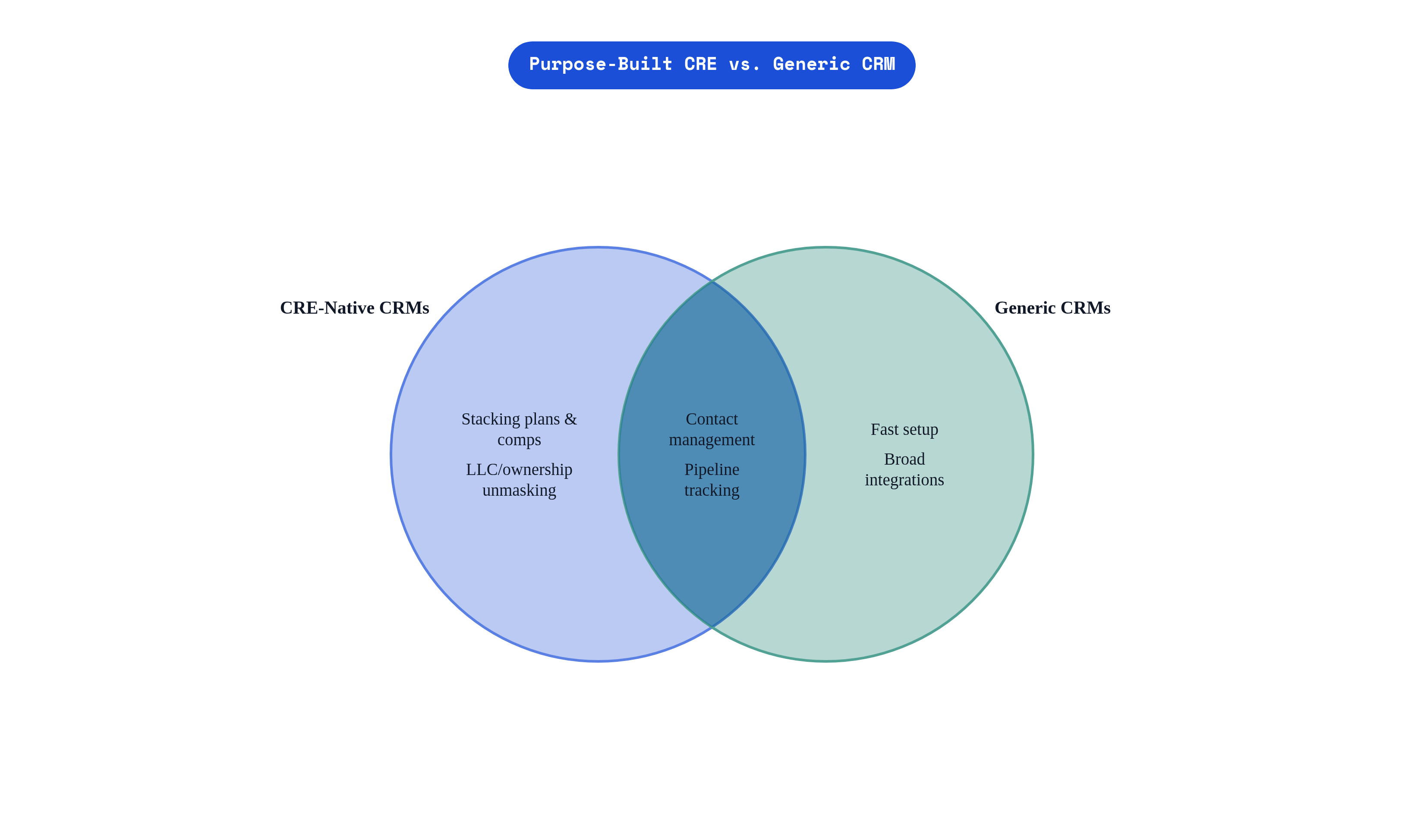
Start with what a "normal" CRM assumes. Contacts, companies, deals, tasks, close. One buyer, one seller, one timeline, everybody moves in roughly the same direction toward roughly the same outcome. That model works fine if you're selling software subscriptions or running a dental practice's follow-up calls. It falls apart almost immediately in commercial real estate, where a single deal might have an investor, a tenant, a landlord, two brokers representing opposite sides, a lender, an attorney or three, and a property manager, each running their own clock and caring about different things at different moments. Beyond the people, brokers need to track properties and their ownership history, lease terms, stacking plans, comp data, and commission splits, none of which fit cleanly into a "contact" or "company" record no matter how many custom fields you bolt on.
That's the thing worth sitting with before we go further: this runs deeper than a missing feature. A feature gap means the tool is missing a button. This is architectural, meaning the data model itself, the actual skeleton the software is built on, doesn't reflect how CRE deals move. You can't fix a skeleton with a plugin.
How CRE brokers actually use CRM across the deal lifecycle
Break the CRE deal lifecycle into four stages and the mismatch gets easier to see.
Prospecting comes first, and in CRE this is not a quick email sequence. It's identifying likely sellers or tenants, digging through ownership entities (sometimes LLCs designed specifically to be hard to trace back to a human), and building lists by asset type and geography. This can precede an actual deal by years. Ask any investment sales broker how long they've been quietly tracking a particular owner before that owner finally decided to sell, and the answer is often measured in years, not months.
Property matching comes next: connecting the right contact to the right listing, checking tenant requirements against available inventory. Then deal management, which is the part everyone thinks of when they hear "CRM": LOIs, counteroffers, due diligence milestones, multi-party communication threads that need to live somewhere other than someone's inbox. And finally, post-close and relationship maintenance, tracking lease expirations, renewal windows, comp records, and keeping long-dormant owners warm because in three years they might sell and you want to be the first call they make.
Most generic CRMs handle stage one reasonably well and stage four not at all. It's worth noting that adoption data on real estate professionals broadly shows a strong majority use CRM to manage sales funnels, but that funnel language is itself part of the problem: CRE pipelines aren't linear. Deals fall through, owners re-enter the market eighteen months later, and a "closed lost" record needs to come back to active status. A broker evaluating a platform should map these four stages against what the software actually does in each one, not against a checklist of feature names that sound impressive on a sales call.
What "best fit" depends on before any platform enters the conversation
Before comparing platforms, a broker needs to know their own profile. Three variables matter more than any feature list.
Deal type and asset class comes first. Investment sales work is fundamentally about owners and capital markets relationships; tenant-rep and landlord-rep leasing runs on a completely different rhythm. An industrial broker tracking a client's forty-site logistics portfolio needs property-level data that looks nothing like what a boutique retail specialist needs.
Team size and internal resources is the second. A solo broker needs to be productive by Tuesday afternoon, not after a six-week onboarding. A brokerage with fifty producers needs shared visibility, activity logging, and reporting that rolls up cleanly across the whole team. An enterprise shop with an actual IT department can absorb deep customization that would sink a five-person team.
Third: existing tech stack and data habits. A brokerage already running Salesforce for other business lines has a different switching cost than one running everything out of spreadsheets and manual tracking. And if the firm already uses a marketing platform for OM distribution, how tightly the CRM needs to talk to that platform becomes a real question rather than a nice-to-have.
Here's the part that should stop you before you read the vendor comparisons below: a national brokerage evaluating enterprise software has almost nothing in common with a five-person investment sales boutique. They should not be reading the same recommendation, and if a "best CRM" article hands them the same answer, something's off. So figure out your own profile first. Which bucket are you in? Answer that before the names start flying.
Purpose-built CRE platforms: Buildout (Rethink), AscendixRE, and ClientLook
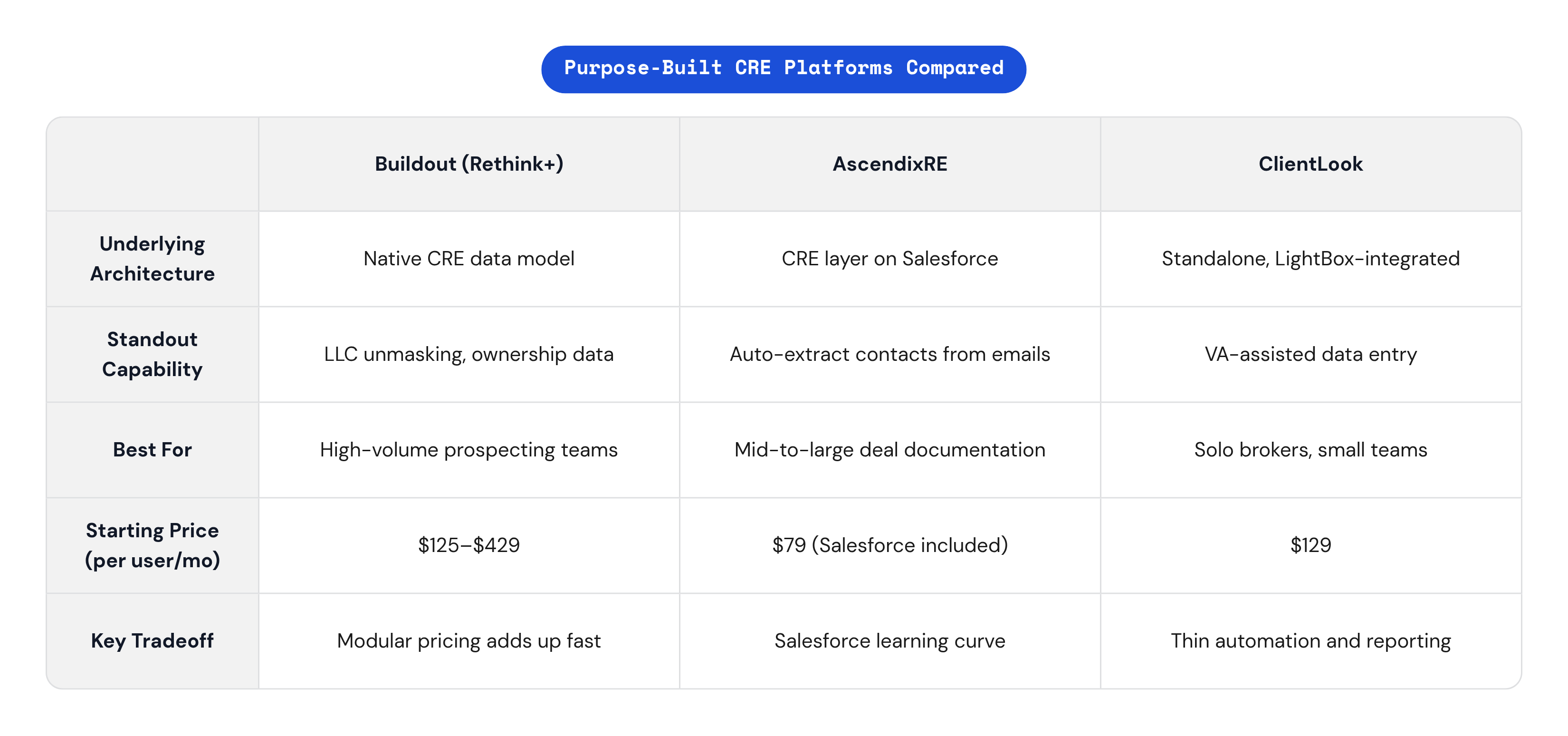
Three purpose-built options come up constantly in CRE circles, and each earns its spot for a different reason.
Buildout's Rethink platform, unified into Buildout CRM in a March 2026 release, ties CRM, marketing, and prospecting together in one shared data layer, which is the company's answer to the problem of brokers juggling separate tools for separate stages of the deal lifecycle. The more interesting piece is Rethink+, launched in August 2025, which embeds property and ownership data directly into the CRM itself: likely-to-sell scores, AI-powered unmasking of the LLCs and shell corporations that own most commercial property, and verified contact details pulled up automatically. That directly attacks the ownership research problem that eats years off a prospecting broker's timeline. Buildout says it's trusted by over 50,000 brokers, and its data model treats properties, stacking plans, and comps as native objects rather than fields tacked onto a contact record. Pricing starts at $129 per user per month for Rethink CRM, or $125 for the unified platform, with Rethink+ running $299 per user per month at the Regional tier (200 prospecting credits) and $429 at the National tier (500 credits). The best fit is a brokerage that wants one system from first cold call through commission split, especially one already inside the Buildout marketing ecosystem. The tradeoff: the modular pricing means your total bill can climb in ways that are hard to forecast as you add tiers.
AscendixRE takes a different architectural bet: it's a purpose-built CRE layer sitting on top of Salesforce infrastructure, which gives a firm Salesforce-grade scalability without forcing anyone to become a Salesforce configuration expert. It ships with CRE-specific data models for brokerages, owner-operators, developers, and capital markets teams, and its 2026 AI Suite add-on plugs in Claude and ChatGPT to draft property emails and summarize deal notes without leaving the platform. The standout feature is Harvest: forward a LoopNet inquiry or an LOI email and the system extracts contacts, properties, and lease terms automatically, drafting them as CRM records for you to approve rather than type in by hand. Add in map-based comp searching that spits out client-ready PDF reports, and you've got a platform with genuinely strong back-office capability. Pricing runs $79 per user per month including the Salesforce license, with the AI Suite add-on starting at $39 per org per month. It's a strong fit for mid-size to large brokerages that want Salesforce infrastructure without a full custom Salesforce build, particularly teams generating heavy deal documentation. The catch: if your team has never touched Salesforce, budget real time for onboarding before anyone's moving fast in it.
ClientLook, now under LightBox, leans hard into simplicity. It's marketed as close to training-free, with onboarding measured in minutes rather than weeks, which for a solo broker is not a small thing. Its integration with LightBox's LandVision database gives users access to over 155 million property records nationwide with ownership, sales, and financing data updated in near real time, bundled into the subscription rather than sold separately. The feature that actually sets it apart from the other two: Virtual Assistant support, where a broker can hand off contact updates, property entries, and comp adjustments to a VA team instead of doing that data entry themselves late at night. Native mobile apps round it out. Pricing sits at $129 per user per month. It's the right call for solo brokers and small teams who care more about being productive by Friday than about automation depth. The drawback is real, though: development has slowed in recent years, and marketing automation, social integration, and reporting stay thin, so a team that expects to outgrow those limits should plan for a migration down the road rather than be surprised by it.
When Salesforce or a customized general platform is worth considering
Salesforce sits at the top of nearly every general CRM comparison, and there's a reason: nothing else matches its customizability, its integration ecosystem, or its enterprise-grade reporting and permission controls. For a large commercial brokerage with an internal CRM admin team, or one willing to lean on AscendixRE as the CRE configuration layer on top of it, Salesforce can outperform purpose-built tools purely on flexibility and scale.
But that flexibility comes at a price, and the price is time. Raw Salesforce doesn't know what a stacking plan is. It doesn't know what a comp is. Every bit of that has to be configured by hand, which means the tool that's supposedly infinitely adaptable requires serious upfront investment before it does anything useful for a CRE workflow.
So when does it actually make sense? When the firm already runs Salesforce for other business lines and CRE is just one more department joining an existing environment. When there's a real need to integrate with ERP, finance, or other enterprise systems that a boutique CRE tool was never built to talk to. And when reporting and cross-team visibility needs outgrow what the purpose-built players offer out of the box.
When it doesn't make sense is just as important: a team without dedicated admin resources frequently ends up with an under-configured Salesforce instance that performs worse, at a higher cost, than a simpler CRE-native tool would have. Other general CRMs, the HubSpot and pipedrive-style tools, sit in a similar spot: cheap, fast to set up, and eventually just as mismatched to property-level relationship data as any generic pipeline tool would be. The architecture problem from section one doesn't go away just because the monthly bill is smaller.
The metrics that actually move when brokers use the right CRM
As of 2024, NAR reported that 62% of U.S. real estate agencies had adopted CRM software for client management, which means a meaningful chunk of the industry is still running deals out of spreadsheets and inbox folders. That's not a moral failing, it's just a fact worth sitting with, because it means the comparison most data sources actually measure is CRM versus no CRM at all, rather than which CRM is best.
And on that comparison, the numbers are not subtle. Firms using dedicated CRM software report a 29% increase in sales compared to firms running relationships manually. Brokerages that describe their CRM strategy as fully adopted report their sales teams becoming 26% more productive. Straits Research, in 2024, found real estate companies using CRM see a 41% increase in revenue per sales rep. Those are big numbers, and they're worth taking seriously.
They're also incomplete for our purposes, and it's worth being honest about that. These figures come from the broader real estate industry, not CRE specifically, and they measure adoption against non-adoption, not right-fit CRM against wrong-fit CRM. That second comparison, the one that actually matters for a broker choosing between AscendixRE and an unmanaged spreadsheet, doesn't have a clean controlled study attached to it. CRE deal complexity suggests the gains from a well-matched platform (fewer dropped follow-ups, shorter prospecting cycles, ownership research that takes days instead of months) could run larger than the industry-wide averages. But "could run larger" isn't a citation, it's a reasonable inference, and the honest answer is that the data doesn't fully close the loop yet.
What that leaves us with is a ceiling worth restating: the goal was never just "use a CRM." Using one that reflects how your deals actually move is the whole argument this piece has been building toward.
Matching the right platform to deal type, team size, and growth stage
So, where does that leave an actual broker trying to make a decision this quarter?
If you're a solo broker or a small team under five producers, your priorities are fast onboarding, low admin overhead, mobile access, and property data that doesn't require a second subscription. ClientLook fits well here, especially with its VA support taking data entry off your plate. Buildout's base tier is worth a look too if your prospecting volume is already high and you want a platform to grow into rather than switch out of later.
Mid-size brokerages, call it five to fifty producers with a mixed bag of deal types, need shared visibility across the team, real deal-stage tracking, comp management, and the ability to spit out marketing-ready deliverables. AscendixRE fits teams that value Salesforce-grade infrastructure and generate a lot of deal paperwork; Buildout CRM fits teams that want the marketing-to-deal pipeline unified in one place.
Large or enterprise brokerages with internal admin resources should be thinking about deep customization, cross-system integration, and permissions management at scale. That's Salesforce with AscendixRE as the CRE configuration layer, or Buildout for a firm committed to staying CRE-native even at large scale.
Investment sales and capital markets teams live and die by ownership research and LLC unmasking, which makes Buildout's Rethink+ a direct answer to a specific, expensive problem: the hours brokers burn trying to figure out who actually owns a building before they can even make the first call.
Leasing-focused and tenant-rep teams care less about unmasking shell companies and more about property matching, availability tracking, and requirement management, so the real question to ask any vendor is how they handle tenant requirement records against live availability, not how good their ownership data is.
Before signing anything, ask four questions. Does the data model treat properties as first-class records, or are they an afterthought hanging off a contact? Can the pipeline be reconfigured around how your deals actually stage, rather than a generic sales funnel someone designed for software sales? What does implementation actually look like, and who on your team owns it once the salesperson stops calling? And if you grow or add a service line next year, does the platform scale with you, or are you migrating again in eighteen months?
None of this points to a single universal winner, and that's sort of the point of the whole exercise. The right CRM is measured by how closely its architecture matches your deal type and your team's reality, not by its feature list length — closely enough that your brokers open it every day without being told to.